Author: rory-admin

  • Maximizing your tax deduction potential with Section 179

    Maximizing your tax deduction potential with Section 179

    It’s September which means we’re almost to the fourth quarter where most businesses look ahead towards end of year activities, it’s not unusual for us to see an increased interest in locking down new equipment and upgrades before year end.

    Each year we begin promoting the benefits of Section 179, you can learn more about it in our updated guide for 2023 or continue reading.

    In a nutshell, Section 179 is a tax savings benefit that allows you to deduct the cost of equipment you use for work from your (in some cases up to 100% of the total cost) from your tax expenses. When used correctly, this means you can purchase upgrades for your business and receive that money right back into your business when you file the following year.

    Section 179 is a permanent part of the tax code here in the United States but that doesn’t mean it’s static. Each year the deduction limits are adjusted for inflation. You can see on the chart below what this year’s limits are.

    You can choose to take the deduction in one lump sum or take a deduction for depreciation each year instead – it’s completely up to you.

    What equipment or technology purchases qualify for Section 179?

    1. New Equipment: This includes computers (as long as they’re used in your business at least 50 of the time), servers, backup devices, phone system hardware and more.
    2. Components: Such as hard drives and solid-state drives, RAM, video cards, monitors and more.
    3. Refurbished Equipment: You don’t have to buy new equipment to qualify for Section 179, in fact if you’re in the market for a new server and have been debating new vs refurbished, we have an article where we weigh in here. Equipment can also be financed or leased and still qualify.
    4. Software: If you’re looking to purchase software upgrades for your business this year – such as upgrading an older copy of Windows to the latest version – these would also qualify.
    5. Professional Services: Even professional services like ours can possibly be deducted under Section 179.

    We find many businesses are looking to make purchases before the year end because that’s when a clearer picture of their financials is available but be warned. For a purchase to qualify in 2023 these purchases must be made before December 31st. Even if the purchase was planned as part of this year’s budget, if it’s purchased January or later it will not count for this year’s taxes.

    If you’re looking for the exact math on a potential purchase and the savings you will net, we can recommend this calculator, it has been updated for 2023. It’s also important to note that the ceiling for your particular business is your net income, you cannot deduct more money than you made that year, however you can carry the deduction forward to the next year.

    We’ve spent some time discussing what does qualify under Section 179, but what about what doesn’t? The following items would not qualify under Section 179:

    1. Intangible Assets: This would include things like patents or copyrights as an example.
    2. Land: You cannot purchase land and claim a deduction for Section 179.
    3. Purchased from family: Unfortunately, you cannot claim purchases that are made through a family member. Even if the product itself would normally qualify, if the item was purchased through a sibling, parent’s or spouses’ separate business it will not qualify.

    Interested in making technology upgrades in your business and utilizing Section 179 in 2023? Valley Techlogic can help, we offer procurement services as well as technology solutions that are covered by this very useful tax code. Learn more today by scheduling a consultation.

    Looking for more to read? We suggest these other articles from our site.

    This article was powered by Valley Techlogic, an IT service provider in Atwater, CA. You can find more information at https://www.valleytechlogic.com/ or on Facebook at https://www.facebook.com/valleytechlogic/ . Follow us on Twitter at https://x.com/valleytechlogic.

  • Threat actors attack on cloud company leads to customers data being wiped completely

    Threat actors attack on cloud company leads to customers data being wiped completely

    Last week a Danish cloud provider called CloudNordic suffered a cyber attack that led to them losing all of their customers data in one fell swoop.

    The hackers who gained access to CloudNordic’s system immediately issued a financial demand that the company was unable and unwilling to meet and led to all of their data being encrypted by the hackers. The company said that no evidence of being hacked was left behind other than the encrypted data.

    This hack also effected their sister company, AzeroCloud, and both companies released identical statements on the ongoing issues they’re facing after this event, you can see the statement below translated to English from Danish.

    In an effort to start over the company has establish a new name and new servers and have offered to restore their clients to servers with the same name as they had previously, though they’ve also included instructions for customers who want to move their domains to new hosts.

    CloudNordic suspects the attack occurred while they were moving data centers, exposing them to already infected systems. As they were mid-migration it allowed the attackers access to their systems and even their own backups.

    CloudNordic states “”The attackers succeeded in encrypting all servers’ disks, as well as on the primary and secondary backup system, whereby all machines crashed and we lost access to all data,”.

    They’ve stated while the data was scrambled during the attack, they don’t believe the attackers copied customers data as is typical with ransomware attacks, so it’s unlikely individual customers will be targeted to be ransomed back their data.

    No known ransomware group has so far taken credit for this attack. The company CloudNordic and their sister company AzeroCloud have both said they plan to try to rebuild from here without access to their previous data.

    At Valley Techlogic, backups are an important puzzle piece when it comes to maintaining the security of your business. For many businesses, a cyber event where all of your data is lost would be difficult to impossible to recover from. Many businesses that suffer attacks like these end up going out of business.

    That’s why we created our triple layer backup plan, TechVault.

    With TechVault you not only have an onsite copy of your data, there’s also a cloud backup and what we call an archival backup.

    This archival backup is what makes this program we’ve created special, as it’s write once read many. Basically, the data can be copied back to you as many times as needed but once it’s on there, it cannot be deleted.

    This, in addition to the 24/7 monitoring we provide as well as firewall, antivirus and other protections means your data is virtually bullet proof.

    If you would like to learn more about what makes Valley Techlogic a cyber security leader in the Central Valley, schedule a consultation with us today.

    Looking for more to read? We suggest these other articles from our site.

    This article was powered by Valley Techlogic, an IT service provider in Atwater, CA. You can find more information at https://www.valleytechlogic.com/ or on Facebook at https://www.facebook.com/valleytechlogic/ . Follow us on Twitter at https://x.com/valleytechlogic.

  • Looking to up your online platform game? These 5 tools will help you run your online business better

    Looking to up your online platform game? These 5 tools will help you run your online business better

    If you’re running a business in 2023 you know that having an online presence is often the key to growth (and if you need advice on that we’ve written about it before), but how much of your workflow is presently in the digital workspace?

    We still see plenty of businesses that are still working off pen and paper, eschewing digital files for a wall of file cabinets and communicating via fax rather than email (did you know that you can receive fax via email now)?

    There’s nothing wrong with being old school, but it can slow down the kind of progress you’re hoping to make with your business. Nowadays, people expect an instantaneous response to their questions or concerns and if you’re not used to communicating that way it can cause them to look for a service that will, and automation can cement workflows that would otherwise be hit or miss when left up to an individual (like your marketing efforts via email).

    In a nutshell, it’s a good idea to bring as much of your business into the digital world as you possibly can. That doesn’t mean you can’t keep the techniques that helped you build your client base in the first place – but throwing a modern digital spin on them may help you reach more clients AND impress them.

    So, what are the five tools you should be looking into when it comes to upping your technological game?

    1. First there are marketing tools, such as a CRM (Customer Relationship Management). Beyond being a handy client database, many CRMs provide automated processes for tracking activities with those clients (such as phone calls or emails). It’s also a collaborative tool for your employees, if your employee Susan is wondering if Client A was called last week, she can just check the CRM rather than ask everyone in the office.
    2. Website building tools are also another great option for expanding your business, especially if you don’t currently have a website. It doesn’t have to be a complicated or expensive process, depending on your needs it could be as simple as a one page informational that includes items like your location, hours, and contact information. Making sure your business can be found in a web search is an important part of attracting new customers.
    3. If you’re still handling paper checks for all of your transactions and are left waiting for payments to come in the mail, we ask – why? Online payment processing options have grown dramatically, and they could not be easier to use, for you OR your clients. We think it’s always a good idea to give people more options to give you their money as well.
    4. Branding for your business doesn’t have to be complicated. If you have a company logo that’s really all you need to get started using tools like Canva or Adobe Express. There are many pre-loaded templates for you to use to advertise your business, you just add your logo and download to post on your social media pages (we’ve written about improving your social media presence as well).
    5. Communication tools are another big area you can improve your business technologically, not just with your clients but with your employees as well. Online meetings grew in popularity in the last few years, and we think they’re still an excellent way to keep in touch with clients who might otherwise not want to expend the time or effort on an in-person meeting. You can also use chat programs to touch base with employees without interrupting their workflow with a phone call or visit to their office. We use Microsoft Teams here at Valley Techlogic but there are many great and versatile options available now.

    Of course, the best way to improve your business’ technological prowess is to engage with a technical provider that can knows the ins and outs of today’s modern technology and can best support your efforts to grow your business. That’s where Valley Techlogic comes in.

    Interested in learning more? Schedule a consultation with us today.

    Looking for more to read? We suggest these other articles from our site.

    This article was powered by Valley Techlogic, an IT service provider in Atwater, CA. You can find more information at https://www.valleytechlogic.com/ or on Facebook at https://www.facebook.com/valleytechlogic/ . Follow us on Twitter at https://x.com/valleytechlogic.

  • Discord.io data breach sees 760,000 users information stolen and an end to the service

    Discord.io data breach sees 760,000 users information stolen and an end to the service

    If you’re not familiar with Discord, it’s a chat service that first opened to the public in 2015 and quickly grew in popularity having a base of 3 million users just one year later in 2016. Now in 2023 there are over 150 million users, and the platform has been valued at $7 billion.

    Discord filled a niche that had been previously left vacant since chat services like AOL and MSN were discontinued. In the early 2000’s to 2010’s forum-based communication rose in popularity and left many chat rooms empty.

    Now as trends have changed, chat has seen a resurgence in popularity with Discord acting as a vector for many special interest groups to gather and discuss their hobbies, or for consumers to follow live updates about a product they’re interested in and even speak directly with its creators and get an inside look into the development process. No matter what your interest is, gaming, home improvement, DIY, art, music – there’s probably a Discord channel dedicated to it.

    Discord.io was a third-party website that allowed users to find and share chat channels, we’re unfortunately saying was because after the breach they announced their services would be closed for the “foreseeable future”.

    On the website it says “”We are still investigating the breach, but we believe that the breach was caused by a vulnerability in our website’s code, which allowed an attacker to gain access to our database. The attacker then proceeded to download the entire database, and put it up for sale on a [third] party site,”. They’ve also listed the information that was released in the breach which included users encrypted passwords, their email and username, and even billing and payment information if they partook in a premium membership through the site.

    While they’re not directly associated with Discord, this breach will still have an effect on Discord itself not just because this service has been discontinued but because of the overlapping data Discord and a Discord-centric third party application will have.

    The unfortunate rub of it is when you utilize third party vendors for the products and services you use you’re sharing the same information with them as you are with everyone else, and a breach through an outside vendor can effect you as much as a breach to your business directly.

    That’s why it’s important to vet your vendors and have protections in place to limit the effects a data breach can have. Protections can include:

    1. If the breach involves financial data that could be used for identity theft, consider freezing your credit. This will limit the damage someone can do with your identifying information. If you’re not ready or aren’t able to freeze your credit, then we suggest credit monitoring at the very least (often provided for free by banking and credit card companies).
    2. Don’t use the same password from one account to another. As we mentioned, password data was leaked in the Discord.io breach. While it’s encrypted data which is a good protection, many of these passwords will be cracked, and the people who purchased this information will try the password on users other accounts such as their email. If you use a different password for all of your accounts in unison with a password manager then a password leaked in a breach will only effect one account, greatly limiting the damage that can be done.
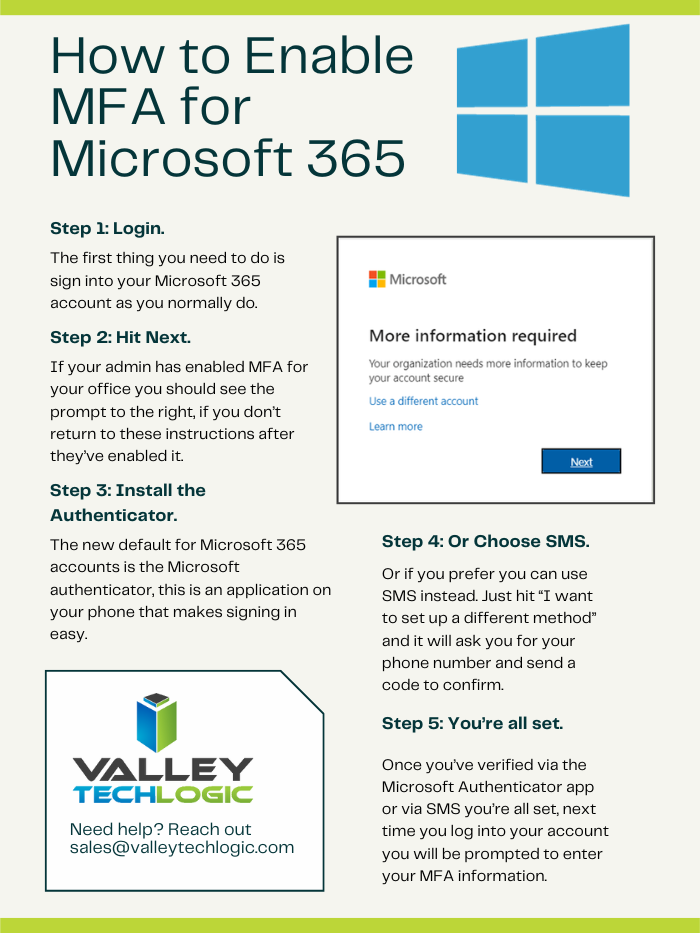
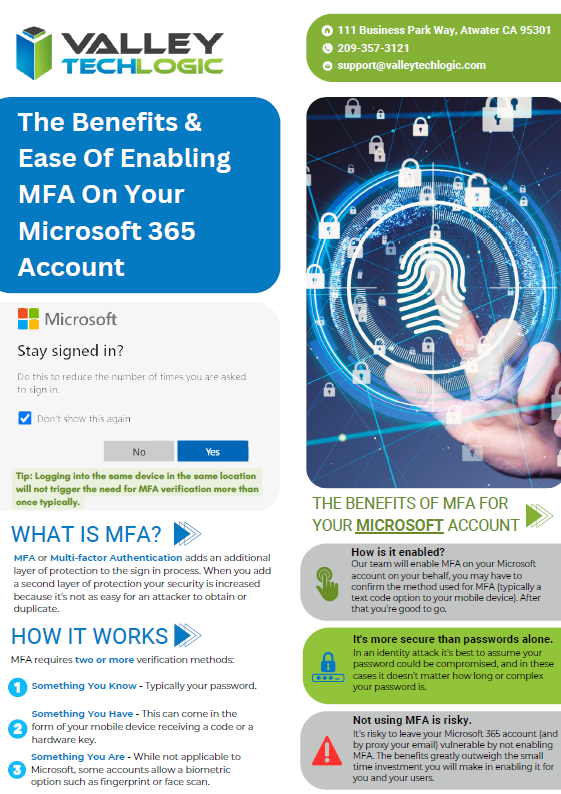
    3. Similarly to above, to protect your accounts from intrusion you SHOULD be using MFA (Multi-Factor Authentication). We recently posted another article outlining the benefits of MFA, but in a nutshell if a hacker has gotten enough information about you from data breaches they may be able to utilize it to gain access to your accounts – even WITHOUT a password. MFA will stop most hackers in their tracks.

    Even with protecting yourself, it’s still a good idea to try to limit the funnel of information about you or your business that can unknowingly end up on the web through third party breaches. Here are 5 additional ways to protect your data:

    Want to learn more about how to recover from a data breach, boost your cyber security readiness, or gain additional insight in the kinds of questions you should be asking your vendors about your data? Valley Techlogic can cover all these topics and more. Schedule a consultation with us today.

    Looking for more to read? We suggest these other articles from our site.

    This article was powered by Valley Techlogic, an IT service provider in Atwater, CA. You can find more information at https://www.valleytechlogic.com/ or on Facebook at https://www.facebook.com/valleytechlogic/ . Follow us on Twitter at https://x.com/valleytechlogic.

  • BEC Scams are becoming increasingly more common, and the payouts more lucrative

    BEC Scams are becoming increasingly more common, and the payouts more lucrative

    BEC or Business Email Compromise is a type of phishing scam where the target of the scam receives an email purporting to be someone they know, like a vendor they work with or a colleague. These scams are so common place that the Federal Bureau of Investigation even has a guide to protecting yourself from them.

    We’ve even written before on how to spot a typical BEC email and a few ways to combat it, but we would like to circle back to this topic now as we creep into what is typically a very busy time for most business owners – the fourth quarter.

    You may or may not be surprised to learn that BEC attacks rose in the fourth quarter last year and we’re not anticipating 2023 to be any different. 2022 even saw a rise in the ever popular “as-a-service” variant of attacks which means would be bad actors could enact their attacks with little actual effort on their part.

    The technical know-how required for these attacks is also low, with some of them being as simple as just a variant on your normal phishing scheme but with the end goal being a direct payout rather than the user’s credentials or private information.

    CISA (Cybersecurity and Infrastructure Security Agency) even reported on Russian state sponsored bad actors specifically targeting defense contractors using Microsoft 365 with their BEC schemes. Imitating Microsoft support is not a new scam, and like always you should be wary about any support person reaching out to you directly asking for your credentials, but the single-minded focus of this particular scam put government agencies like CISA and the FBI on red alert.

    When we say these scams are becoming more lucrative, we definitely mean it, with it being estimated BEC victims lost 2.74 billion dollars in 2022 which was $300 million more than 2021. Like with most cyber attacks we anticipate they’ll continue to rise.

    So how do you protect yourself from a Business Email Compromise scam in 2023?

    1. Don’t overshare online. BEC is a social engineering scam, so the less information that’s readily available about you on the internet the less able a scammer is to pretend to be someone you know.
    2. Forward emails instead of replying to them. As with normal phishing these scams are perpetrated over email. Forwarding emails forces you to type out the email address (thereby guaranteeing it goes to the right person). BEC attacks usually involve spoofing an email address or simply choosing a domain that’s similar to one you may be use to corresponding but having a slight misspelling or rewording.
    3. In the same vein, check the sender’s email address before responding at all. You may be able to simply block the scammer when you discover they’re trying to imitate someone else by verifying the email address is incorrect.
    4. Secure your own domain against domain spoofing. Many times, the attack is coming from “inside the house”. A very common BEC scam involves one of your employees receiving an email that looks like it’s from you or someone high up in your organization, except it’s not. Registering the domains you use for email will help protect against this very common variety of this scam.
    5. Again, in the same vein as our last tip, use a domain that you’ve registered instead of a free email service. It might be tempting to keep using the Gmail address you’ve always used to avoid paying for a domain and email services, but it greatly increases your risk of a BEC attack being successful. Using a free email service allows attackers to create a new email with your name to then tell those you know you just “got a new email”. It would be very difficult to prove this is false without talking to you directly.

    Many of the defense strategies against a BEC attack involve employee training.  Attackers may not target you directly as the business owner when it’s easier to get to you (and your business) through a weaker link – often employees who don’t have the strategies available to avoid these kinds of scams.

    Luckily, Valley Techlogic provides security training as part of our service packages. Below is a list of some of the training topics we cover for our clients:

    Cyber security training is quick and is one of the easiest and most effective ways to have an overall safer environment for your business. Learn more about Cyber Security Training through Valley Techlogic as well as other the other cyber security services we offer today through a quick consultation.

    Looking for more to read? We suggest these other articles from our site.

    This article was powered by Valley Techlogic, an IT service provider in Atwater, CA. You can find more information at https://www.valleytechlogic.com/ or on Facebook at https://www.facebook.com/valleytechlogic/ . Follow us on Twitter at https://x.com/valleytechlogic.

  • Windows Server 2012 R2 End of Life is just a couple months away, are you ready?

    Windows Server 2012 R2 End of Life is just a couple months away, are you ready?

    Windows Server 2012 and Windows Server 2012 R2 are quickly approaching their End-of-Life date of October 10, 2023. This is just over 2 short months away and in the world of data migration (especially as it relates to servers) that doesn’t give you a lot of time if you’re still using this operating system in your business.

    If you’re not in the loop you may be wondering what the big deal is with letting it lapse, it’ll still work right? Well yes and no. The timing of this End-of-Life event coincides with when Microsoft usually does their biggest feature and security updates for the year (typically October).

    This means that those still using Windows Server 2012 will miss out on these updates, and all future updates to come unless you sign up for extended support (at a cost) and even then, that will only provide you with some security updates, there will be no future feature updates for Windows Server 2012.

    You may be on the fence because you aren’t sure if you want to continue using an on-premises server or make the move to the cloud. We actually wrote a detailed article on this topic before and how it relates to the pros and cons of moving to the cloud or remaining with an on-premises server. You can find that article here.

    If you are planning on trying to upgrade soon, we have a couple of steps we can recommend as you prepare:

    1. Decide which operating system you’ll be upgrading to. Typically we recommend upgrading to the most current operating system to give you the longest span of time before an upgrade will be needed again, however depending on your hardware or even specific software you use in your business this may not be feasible. We suggest having your server evaluated to determine which upgrade makes sense (or if an upgrade is even possible.
    2. If you discover your server can’t be upgraded, you’ll need to make plans for a new system. If you have an older server (over 5 years) you’ll need to determine whether an upgrade to the most recent version of Windows Server is even possible. If it’s not, you’ll have to pivot to purchasing a new system instead. There are many benefits to upgrading to a new server and an IT provider like us can help you narrow down your choices based on your business’s needs.
    3. Decide whether a clean installation is possible. If most of the data on your server is backed up elsewhere, for example if you have duplicate copies of your data in the cloud (which we highly recommend) then you can do a clean install without having to worry about the data already on the device.
    4. If a clean installation is not possible, you will need to do a migration. A migration is a slower process of updating your server to the latest version. If you’ve ever upgraded the operating system on your computer, you can probably relate as it’s similar just much longer and with more potential pitfalls. We only recommend a migration be attempted by a qualified IT technician.
    5. Plan for the future now. Scrambling to figure out what to do when an End-of-Life event for your device is coming up is stressful and fortunately, avoidable. Modern versions of Windows Server can perform what’s called an “In-place upgrade” which means an upgrade can occur with very little downtime or stress. Staying on top of your Microsoft and Windows updates and upgrades will mean you have the most secure version of their systems available and much less chance of a catastrophic failure occurring on your devices.

    To help with your planning for Microsoft’s upcoming End-of-Life events, we’ve created this chart with the latest dates to keep track of.

    If you need assistance with upgrading your Windows Server 2012 or Windows Server 2012 R2 device, or have questions about Microsoft products in general, Valley Techlogic can help. We are long time Microsoft partners, and our technicians have a wealth of experience in supporting Windows devices and navigating Microsofts offerings. Schedule an appointment today to learn more.

    Looking for more to read? We suggest these other articles from our site.

    This article was powered by Valley Techlogic, an IT service provider in Atwater, CA. You can find more information at https://www.valleytechlogic.com/ or on Facebook at https://www.facebook.com/valleytechlogic/ . Follow us on Twitter at https://x.com/valleytechlogic.

  • Zero-click exploits, how they work and how to avoid them

    Zero-click exploits, how they work and how to avoid them

    What comes to mind when it comes to viruses and malware and how they infect a device?

    Most of us think of someone accidentally downloading an infected program from an email or website, which we’re sorry to say doesn’t always end in the much maligned and feared .exe. These days executable files with malware can take the guise of an image, PDF, and more.

    Unfortunately, now users can be infected by malware or a virus without clicking on anything at all. A zero-click exploit can compromise a device without any action from its owner. While most malware is spread through social engineering attacks (tricking a user via email or on a webpage) zero-click exploits make use of existing vulnerabilities found on operating systems.

    So far these attacks have been mostly affecting mobile devices, with Apple having to release its third update recently aimed at addressing a zero-click spyware campaign that’s been launched to specifically target iMessage users in Russia. The attack dubbed “Operation Triangulation” affected a wide range of Apple devices including iPhones, iPads, Mac OS devices and even Apple TV.

    This type of attack was actually discovered when the iPhone of a journalist in Azerbaijani in 2020 received a silent command to open the Apple Music app. From there, the app connected to a malicious server and downloaded spyware onto the phone, which remained on the phone for 17 months collecting data silently in the background.

    The spyware in this instance was placed and developed by the NSO Group, which is an Israeli based security firm that sells technology to governments and law enforcement agencies. While the company says they’re developing this software as a way to address terrorism and curb crime, it has been misused by the government agencies who contract it in the past. Human rights groups have been critical of the NSO group for the violation of privacy this type of software poses.

    While most of these attacks have been aimed at Apple devices in particular, the NSO group also developed a version that exploited WhatsApp on Android devices. Both Android and Apple have been quick to patch these vulnerabilities as they are discovered.

    While in a different category, these attacks have a similarity to “zero-day” attacks which is when bad actors discover a vulnerability in a specific system and utilize it to gain access or enact malicious activity against the devices that are targeted. It’s referred to as “zero-day” because the product merchant has had zero days to deal with the issue when it’s discovered. The difference between a zero-day attack and a zero-click attack though is with zero-day attacks there’s typically some action that’s needed on behalf of the device owner.

    With zero-click attacks, no action is needed and these attacks can happen completely silently and with no warning.

    So how do you avoid something that sounds at first glance, pretty unavoidable? There are some mobile device hygiene habits that, while not making your phone completely impervious will drastically decrease your risk of falling victim to zero-click attack.

    When it comes to zero-click or zero-day the truth is cyber attacks can happen quickly and with little to no warning. As a business owner, your risk is multiplied by the number of devices you must maintain and secure in your office. That’s where Valley Technlogic can help.

    We are experts in the field of cyber security, we even wrote the book on it (claim a free copy today!) or reach out for a free consultation to learn how we can help mitigate these types of attacks on your business.

    Looking for more to read? We suggest these other articles from our site.

    This article was powered by Valley Techlogic, an IT service provider in Atwater, CA. You can find more information at https://www.valleytechlogic.com/ or on Facebook at https://www.facebook.com/valleytechlogic/ . Follow us on Twitter at https://x.com/valleytechlogic.

  • Zero trust or zero effort, how does your businesses security stack measure up?

    Zero trust or zero effort, how does your businesses security stack measure up?

    Have you been working on strengthening your cyber security stack in your business or crossing your fingers and hoping for the best? How much protection is really enough?

    There are a lot of remedies for improving cyber security out there, but which ones present the best value for your business, and what constitutes a “zero trust” environment?

    If you’re just starting out, these 10 items will greatly improve your business’s cyber security safety in a short amount of time (we call these “best practices”):

    1. Use multi-factor authentication. This one is obvious, but we still see it not being employed regularly. Multi-factor authentication is generally extremely easy to enable (often times just a checkbox) and it greatly improves the safety of that account. When we’re talking about accounts like your business email, or your banking account it’s a no brainer.
    2. Use a password manager. This is another easy one to employ but people still ignore it, or even worse they use the password manager built into their browser. We’re not saying that’s completely wrong, especially if you’ve started using stronger passwords because of it. It’s still a good idea, however, to use a password manager that’s not directly connected to your system. Often times the same password or biometric you use to log onto your computer is the one used to unlock your browsers password database, so if someone has breached the device all those passwords will be available to them too.
    3. Employ Biometrics. Speaking of biometrics, they can be an improvement over passwords when it comes to a physical devices security. Especially for mobile devices, most of us access our work emails, banking accounts, etc. through our phones. It’s very easy to lose a phone, so making that phone unusable to whoever finds it (or has taken it) is a good idea.
    4. Don’t give everyone admin privileges. Not every employee needs all the keys to your kingdom, limit admin access only to those who really need it so if you do have a breach the damage can be limited as well. This is a key component of a zero trust environment (which we describe in the chart below).
    5. Communicate your goals and train your employees. Loop employees into your increased cyber security efforts and provide training, no one wants to be responsible for a cyber-attack in their workplace but without training employees can become unknowing and unwilling threat vectors.
    6. Monitor network activity. Now we’re starting to get into the more challenging topics, monitoring your network activity can be a very effective way of noticing early when something is amiss. There are tools out there that can do this monitoring for you and provide warnings if suspicious behavior is detected (like a device being logged in after hours when it never usually is).
    7. Use encryption. It’s pretty easy to use encryption in email or with sensitive documents (again often just a checkbox) but it’s an effective way to make sure sensitive data doesn’t fall into the wrong hands.
    8. Use backups. Again, in the same vein of protecting your data having automatic backups will greatly increase your chances of recovering after a cyber-attack. Especially if those backups were stored offsite (such as cloud backups). We wrote an article on the best ways to manage your OneDrive storage (which is included in your Microsoft 365 subscription) here.
    9. Regularly patch your devices. Many of your vendors actually provide security protections for you via their patches, which more often than not are addressing specific security concerns that have been identified. Patching costs nothing but your time and the benefits are ten-fold compared to the costs of a security breach in your business.
    10. Have a security audit performed. The best way to address the holes in your security plan is to have a reputable IT company perform a security audit. Valley Techlogic is a provider of these audits in the Central Valley and you can request a consultation here.

    Performing these ten activities in your business will greatly improve your cybersecurity effectiveness across the board, but if you’ve reached the bottom of this article and have realized you do all of these you may be wondering what’s next? Or perhaps you’ve heard of zero trust but aren’t sure what that entails, here are the key components to having a zero-trust cybersecurity environment:

    We address ALL of these topics in our new book, Cyber Security Essentials, which covers all the components of a cybersecurity framework and how to implement them in your business. You can see a preview of the book in the video below.

    [youtube https://youtu.be/jlBAoq4tLNc]

    Looking for more to read? We suggest these other articles from our site.

    This article was powered by Valley Techlogic, an IT service provider in Atwater, CA. You can find more information at https://www.valleytechlogic.com/ or on Facebook at https://www.facebook.com/valleytechlogic/ . Follow us on Twitter at https://x.com/valleytechlogic.

  • The US has declared a $10 million dollar bounty for more information on this ransomware

    The US has declared a $10 million dollar bounty for more information on this ransomware

    The US State Department’s “Rewards for Justice” program announced a 10 million dollar bounty for any information leading to clues on how the Clop ransomware attacks are linked to attacks on foreign governments.

    Announced via Twitter, the Rewards for Justice account tweeted “Do you have info linking CL0P Ransomware Gang or any other malicious cyber actors targeting U.S. critical infrastructure to a foreign government? Send us a tip. You could be eligible for a reward.” This program was initially launched to gather information on terrorist groups targeting US interests.

    The program has now grown to include attacks perpetrated by cyber criminals (even outside the US). It has collected information on the REvil ransomware, Russian Sandworm hackers, Evil Corp hacking group and more.

    This Isn’t the first time the US has announced a substantial bounty for information on cyber crime, in May of this year the Department of Justice also announced a $10 million dollar bounty for information leading to the arrest of the alleged Russian ransomware mastermind Mikhail Pavlovich Matveev, also known online as “Wazawaka”.

    Mikhail Pavlovich Matveev or “Wazawaka” was accused of demanding $400 million from his victims (most of which purportedly paid). His exploits make him one of the most prolific single cyber criminals in history, but due to his illusive nature he still remains uncaught despite the substantial bounty on his head.

    Switching back to our story on the “Clop” ransomware, we covered one of the victims of this ransomware just last week in our article on the CalPers/CalSTRs data breach. Clop was used in the zero-day vulnerability found in the MOVEit file transfer software.

    Now, the group behind the Cl0p ransomware is extorting companies whose data was stolen during the attack and threatening to leak it online if the ransom is not paid.

    Victims of the Cl0p ransomware attack received this message June 17th, outlining the demands the group has for them and even offering an online chat to discuss the terms of payment. Victims are being given just 3 days to come to an agreement or an online page will be created by the group and their information will be leaked online.

    Outside of paying the ransom or dealing with the fallout of their data being leaked, there is little recourse for victims of this type of crime. The bounty is not due to the businesses and individuals whose data has been stolen in this attack, but the fear that the Cl0p ransomware group also received information on data sensitive to US security during their attack.

    The Cl0p ransomware group has said they will be deleting any data that pertains to the US or foreign governments, but of course there is no way to confirm this is true. All in all it will be interesting to see how the effects of offering a bounty for information leading to the arrest of individuals involved in these attacks acts as a deterrent for future attacks.

    If your data was leaked in this recent breach or you’re worried about identity theft, we do have some tips on what to do if your information has been leaked online or or to lower your risk factors below:

    Of course, the best method of keeping your data safe is to prevent it from being leaked in the first place, and Valley Techlogic can help. Cyber security is our main focus, and we know the cost of prevention can often dwarf the cost of remediation when it comes to cybercrime many times over. Learn more about how we can improve the security in your business today.

    Looking for more to read? We suggest these other articles from our site.

    This article was powered by Valley Techlogic, an IT service provider in Atwater, CA. You can find more information at https://www.valleytechlogic.com/ or on Facebook at https://www.facebook.com/valleytechlogic/ . Follow us on Twitter at https://x.com/valleytechlogic.