
Category: Cyber Security

  • Zero-click exploits, how they work and how to avoid them

    Zero-click exploits, how they work and how to avoid them

    What comes to mind when it comes to viruses and malware and how they infect a device?

    Most of us think of someone accidentally downloading an infected program from an email or website, which we’re sorry to say doesn’t always end in the much maligned and feared .exe. These days executable files with malware can take the guise of an image, PDF, and more.

    Unfortunately, now users can be infected by malware or a virus without clicking on anything at all. A zero-click exploit can compromise a device without any action from its owner. While most malware is spread through social engineering attacks (tricking a user via email or on a webpage) zero-click exploits make use of existing vulnerabilities found on operating systems.

    So far these attacks have been mostly affecting mobile devices, with Apple having to release its third update recently aimed at addressing a zero-click spyware campaign that’s been launched to specifically target iMessage users in Russia. The attack dubbed “Operation Triangulation” affected a wide range of Apple devices including iPhones, iPads, Mac OS devices and even Apple TV.

    This type of attack was actually discovered when the iPhone of a journalist in Azerbaijani in 2020 received a silent command to open the Apple Music app. From there, the app connected to a malicious server and downloaded spyware onto the phone, which remained on the phone for 17 months collecting data silently in the background.

    The spyware in this instance was placed and developed by the NSO Group, which is an Israeli based security firm that sells technology to governments and law enforcement agencies. While the company says they’re developing this software as a way to address terrorism and curb crime, it has been misused by the government agencies who contract it in the past. Human rights groups have been critical of the NSO group for the violation of privacy this type of software poses.

    While most of these attacks have been aimed at Apple devices in particular, the NSO group also developed a version that exploited WhatsApp on Android devices. Both Android and Apple have been quick to patch these vulnerabilities as they are discovered.

    While in a different category, these attacks have a similarity to “zero-day” attacks which is when bad actors discover a vulnerability in a specific system and utilize it to gain access or enact malicious activity against the devices that are targeted. It’s referred to as “zero-day” because the product merchant has had zero days to deal with the issue when it’s discovered. The difference between a zero-day attack and a zero-click attack though is with zero-day attacks there’s typically some action that’s needed on behalf of the device owner.

    With zero-click attacks, no action is needed and these attacks can happen completely silently and with no warning.

    So how do you avoid something that sounds at first glance, pretty unavoidable? There are some mobile device hygiene habits that, while not making your phone completely impervious will drastically decrease your risk of falling victim to zero-click attack.

    When it comes to zero-click or zero-day the truth is cyber attacks can happen quickly and with little to no warning. As a business owner, your risk is multiplied by the number of devices you must maintain and secure in your office. That’s where Valley Technlogic can help.

    We are experts in the field of cyber security, we even wrote the book on it (claim a free copy today!) or reach out for a free consultation to learn how we can help mitigate these types of attacks on your business.

    Looking for more to read? We suggest these other articles from our site.

    This article was powered by Valley Techlogic, an IT service provider in Atwater, CA. You can find more information at https://www.valleytechlogic.com/ or on Facebook at https://www.facebook.com/valleytechlogic/ . Follow us on Twitter at https://x.com/valleytechlogic.


  • Zero trust or zero effort, how does your businesses security stack measure up?

    Zero trust or zero effort, how does your businesses security stack measure up?

    Have you been working on strengthening your cyber security stack in your business or crossing your fingers and hoping for the best? How much protection is really enough?

    There are a lot of remedies for improving cyber security out there, but which ones present the best value for your business, and what constitutes a “zero trust” environment?

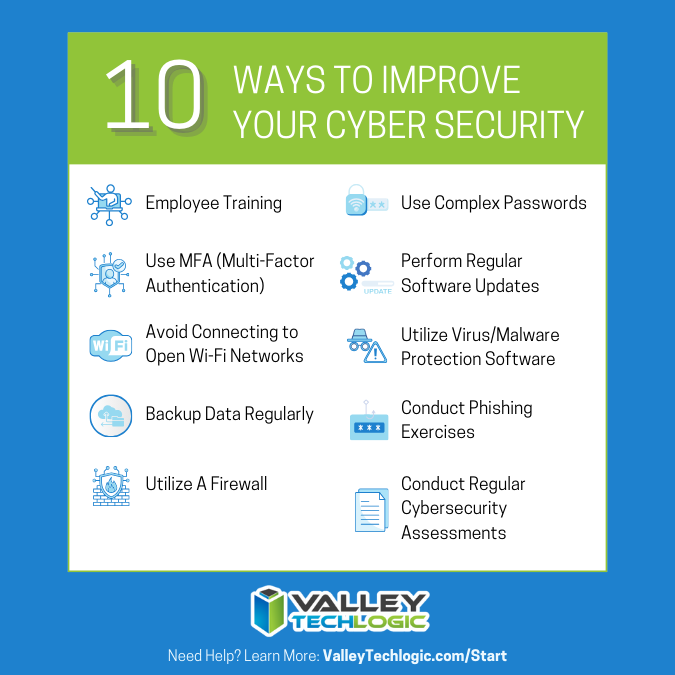
    If you’re just starting out, these 10 items will greatly improve your business’s cyber security safety in a short amount of time (we call these “best practices”):

    1. Use multi-factor authentication. This one is obvious, but we still see it not being employed regularly. Multi-factor authentication is generally extremely easy to enable (often times just a checkbox) and it greatly improves the safety of that account. When we’re talking about accounts like your business email, or your banking account it’s a no brainer.
    2. Use a password manager. This is another easy one to employ but people still ignore it, or even worse they use the password manager built into their browser. We’re not saying that’s completely wrong, especially if you’ve started using stronger passwords because of it. It’s still a good idea, however, to use a password manager that’s not directly connected to your system. Often times the same password or biometric you use to log onto your computer is the one used to unlock your browsers password database, so if someone has breached the device all those passwords will be available to them too.
    3. Employ Biometrics. Speaking of biometrics, they can be an improvement over passwords when it comes to a physical devices security. Especially for mobile devices, most of us access our work emails, banking accounts, etc. through our phones. It’s very easy to lose a phone, so making that phone unusable to whoever finds it (or has taken it) is a good idea.
    4. Don’t give everyone admin privileges. Not every employee needs all the keys to your kingdom, limit admin access only to those who really need it so if you do have a breach the damage can be limited as well. This is a key component of a zero trust environment (which we describe in the chart below).
    5. Communicate your goals and train your employees. Loop employees into your increased cyber security efforts and provide training, no one wants to be responsible for a cyber-attack in their workplace but without training employees can become unknowing and unwilling threat vectors.
    6. Monitor network activity. Now we’re starting to get into the more challenging topics, monitoring your network activity can be a very effective way of noticing early when something is amiss. There are tools out there that can do this monitoring for you and provide warnings if suspicious behavior is detected (like a device being logged in after hours when it never usually is).
    7. Use encryption. It’s pretty easy to use encryption in email or with sensitive documents (again often just a checkbox) but it’s an effective way to make sure sensitive data doesn’t fall into the wrong hands.
    8. Use backups. Again, in the same vein of protecting your data having automatic backups will greatly increase your chances of recovering after a cyber-attack. Especially if those backups were stored offsite (such as cloud backups). We wrote an article on the best ways to manage your OneDrive storage (which is included in your Microsoft 365 subscription) here.
    9. Regularly patch your devices. Many of your vendors actually provide security protections for you via their patches, which more often than not are addressing specific security concerns that have been identified. Patching costs nothing but your time and the benefits are ten-fold compared to the costs of a security breach in your business.
    10. Have a security audit performed. The best way to address the holes in your security plan is to have a reputable IT company perform a security audit. Valley Techlogic is a provider of these audits in the Central Valley and you can request a consultation here.

    Performing these ten activities in your business will greatly improve your cybersecurity effectiveness across the board, but if you’ve reached the bottom of this article and have realized you do all of these you may be wondering what’s next? Or perhaps you’ve heard of zero trust but aren’t sure what that entails, here are the key components to having a zero-trust cybersecurity environment:

    We address ALL of these topics in our new book, Cyber Security Essentials, which covers all the components of a cybersecurity framework and how to implement them in your business. You can see a preview of the book in the video below.

    [youtube https://youtu.be/jlBAoq4tLNc]

    Looking for more to read? We suggest these other articles from our site.

    This article was powered by Valley Techlogic, an IT service provider in Atwater, CA. You can find more information at https://www.valleytechlogic.com/ or on Facebook at https://www.facebook.com/valleytechlogic/ . Follow us on Twitter at https://x.com/valleytechlogic.

  • The US has declared a $10 million dollar bounty for more information on this ransomware

    The US has declared a $10 million dollar bounty for more information on this ransomware

    The US State Department’s “Rewards for Justice” program announced a 10 million dollar bounty for any information leading to clues on how the Clop ransomware attacks are linked to attacks on foreign governments.

    Announced via Twitter, the Rewards for Justice account tweeted “Do you have info linking CL0P Ransomware Gang or any other malicious cyber actors targeting U.S. critical infrastructure to a foreign government? Send us a tip. You could be eligible for a reward.” This program was initially launched to gather information on terrorist groups targeting US interests.

    The program has now grown to include attacks perpetrated by cyber criminals (even outside the US). It has collected information on the REvil ransomware, Russian Sandworm hackers, Evil Corp hacking group and more.

    This Isn’t the first time the US has announced a substantial bounty for information on cyber crime, in May of this year the Department of Justice also announced a $10 million dollar bounty for information leading to the arrest of the alleged Russian ransomware mastermind Mikhail Pavlovich Matveev, also known online as “Wazawaka”.

    Mikhail Pavlovich Matveev or “Wazawaka” was accused of demanding $400 million from his victims (most of which purportedly paid). His exploits make him one of the most prolific single cyber criminals in history, but due to his illusive nature he still remains uncaught despite the substantial bounty on his head.

    Switching back to our story on the “Clop” ransomware, we covered one of the victims of this ransomware just last week in our article on the CalPers/CalSTRs data breach. Clop was used in the zero-day vulnerability found in the MOVEit file transfer software.

    Now, the group behind the Cl0p ransomware is extorting companies whose data was stolen during the attack and threatening to leak it online if the ransom is not paid.

    Victims of the Cl0p ransomware attack received this message June 17th, outlining the demands the group has for them and even offering an online chat to discuss the terms of payment. Victims are being given just 3 days to come to an agreement or an online page will be created by the group and their information will be leaked online.

    Outside of paying the ransom or dealing with the fallout of their data being leaked, there is little recourse for victims of this type of crime. The bounty is not due to the businesses and individuals whose data has been stolen in this attack, but the fear that the Cl0p ransomware group also received information on data sensitive to US security during their attack.

    The Cl0p ransomware group has said they will be deleting any data that pertains to the US or foreign governments, but of course there is no way to confirm this is true. All in all it will be interesting to see how the effects of offering a bounty for information leading to the arrest of individuals involved in these attacks acts as a deterrent for future attacks.

    If your data was leaked in this recent breach or you’re worried about identity theft, we do have some tips on what to do if your information has been leaked online or or to lower your risk factors below:

    Of course, the best method of keeping your data safe is to prevent it from being leaked in the first place, and Valley Techlogic can help. Cyber security is our main focus, and we know the cost of prevention can often dwarf the cost of remediation when it comes to cybercrime many times over. Learn more about how we can improve the security in your business today.

    Looking for more to read? We suggest these other articles from our site.

    This article was powered by Valley Techlogic, an IT service provider in Atwater, CA. You can find more information at https://www.valleytechlogic.com/ or on Facebook at https://www.facebook.com/valleytechlogic/ . Follow us on Twitter at https://x.com/valleytechlogic.
  • California retiree’s pensions possibly in limbo after data breach targets the nation’s biggest pension funds

    California retiree’s pensions possibly in limbo after data breach targets the nation’s biggest pension funds

    News just broke yesterday that a data breach targeting the nation’s biggest pension funds CalPERS (California Public Employees’ Retirement System) and CalSTRS (California State Teachers’ Retirement System) lead to the release of identity information on more than 1.1 million of their members collectively.

    Not only will this breach possibly affect the pensions and identity security of existing members but also those who have not yet reached retirement age but whose information is still in the system. Even family members of affected users may have had their identifying information leaked during the breach if their details were added to these systems.

    CalPERS released a statement saying that the breach did not affect their own systems and it will not affect current members’ monthly benefits. Still, the company has said they have upped their security measures and will be offering free credit monitoring for affected users. Users should receive a notice soon as to whether or not their information was identified as being compromised by the breach.

    Information that was allegedly leaked includes addresses, dates of birth, social security numbers and more.

    The origin of the breach was through the PBI Research Services MOVEit file management software which CalPERS and CalSTRS use as a third-party vendor to identify death benefits or for additional beneficiaries in their systems. The effects of this the zero day hack on the MOVEit software are still reverberating throughout the US, with other companies reporting being affected such as Siemens, UCLA, Schneider Electric and more.

    Although PBI Research Services was notified of the breach themselves on June 4th, it was still two more weeks before CalPERS and CalSTRS were notified which has led to a delayed response. PBI has also notified federal law enforcement to ensure extra steps are taken to protect the pension fund status of affected users. Additional identity checks are expected to be put in place to make sure pension funds are only claimed by those who are eligible for them.

    California’s treasurer Fiona Ma is urging that a special meeting be held to discuss the aftermath of this breach, which only elaborates how serious this is. Ma sits on the board of both pension funds.

    We want to reiterate that pension funds are not currently at risk, however due to the nature of identity theft, preventing future fallout from this breach is of the utmost importance and no small task.

    This breach elaborates on the importance of vetting your vendors well. Even if you’re doing everything you can to protect your business from a cyber-attack, vendors you use that have access to your systems also need to do their part or your efforts may be in vain. Here is a checklist you can use when vetting a new technology vendor:

    If you need assistance in making in recovering for a data breach, or to prevent one from happening to your business in the first place Valley Techlogic is here for you. Cyber security efficacy is one of our core company values and our customers security concerns are regarded with the utmost importance. Schedule a consultation today to learn more.

    Looking for more to read? We suggest these other articles from our site.

    This article was powered by Valley Techlogic, an IT service provider in Atwater, CA. You can find more information at https://www.valleytechlogic.com/ or on Facebook at https://www.facebook.com/valleytechlogic/ . Follow us on Twitter at https://x.com/valleytechlogic.

  • Western Digital suffers a ransomware attack, with hackers requesting an 8 figure sum and leaking image from internal meeting

    Western Digital suffers a ransomware attack, with hackers requesting an 8 figure sum and leaking image from internal meeting

    Western Digital is a well-known name in the data production and storage industry. Established in 1970, they were one of the original players in the process of making semiconductors and they have a storied history that began with calculator chips, included a bankruptcy as well as being at the forefront of floppy disc creation in the 1980’s to eventually the hard drives they became known for in the 1990’s. Chances are good you have had a Western Digital drive in one of your devices (you may even have one now).

    Despite being leaders in the digital storage industry, they’ve unfortunately proven no one is immune when it comes to ransomware attacks. While this story emerged mid-April (and the attack occurred March 26) we have an update as the hacker group “BlackCat” taunts Western Digital by leaking an internal video conference on the topic just this week. They leaked an image from the meeting on social media coyly dubbing the people included “the finest threat hunters Western Digital has to offer”. A clear mockery of their attempts to remediate the threat thus far.

    The hacker group is clearly trying to up the ante to get the company to fork over the ransom they’ve requested, a sum reportedly coming in at an eye watering 8 figures. For context a typical ransomware payment paid out by a business in Quarter 1 of 2022 was $228, 125. For individuals payouts hover around $6000. In a nutshell, ransomware is a lucrative business for those with unscrupulous motives.

    To make matters worse, it’s been reported that the group BlackCat has access to multiple Western Digital systems. Meaning this attack was well orchestrated and highly effective at not only making their data vulnerable but creating a disruption to all parts of their business. Western Digital has reported requested the services of outside security and forensic experts to try and recover what they can but needless to say this is an expensive lesson for their business both in money and time lost as well as their reputation in the technical industry.

    You would think being a leader in data storage that their backup recovery process would be flawless, unfortunately when hackers gain domain level access even the best laid plans for your data can go out the window. That’s why Valley Techlogic offers a multi-pronged approach to backups.

    Many clients like the idea that all their data is at their fingertips within their on-premises server. The server itself serves as a physical reminder that their data is ready and available when they need it.

    Unfortunately, having your data all in one place is not a good idea. Other than ransomware attacks such as this, it also leaves your business vulnerable if your server fails for whatever reason. We’ve seen it before; many clients aren’t expecting their servers to just give out or for something like a fire or other disaster to affect them and when it happens, they’re left scrambling. The process to recover from scratch is not always guaranteed and even if a recovery is possible, it can take as long as 3 months to get back mostly to where you were. Generally, a 100% recovery is not possible in these instances.

    That’s why at Valley Techlogic our backup solution TechVault is available and used by each of our clients. We have this chart on the benefits of our TechVault solution.

    You can also learn more about it by visiting here. If the Western Digital breach has left you concerned for the safety of your data, or you would just like more information on our backup solution you can request a consultation with our expert sales staff here.

    Looking for more to read? We suggest these other articles from our site.

    This article was powered by Valley Techlogic, an IT service provider in Atwater, CA. You can find more information at https://www.valleytechlogic.com/ or on Facebook at https://www.facebook.com/valleytechlogic/ . Follow us on Twitter at https://x.com/valleytechlogic.
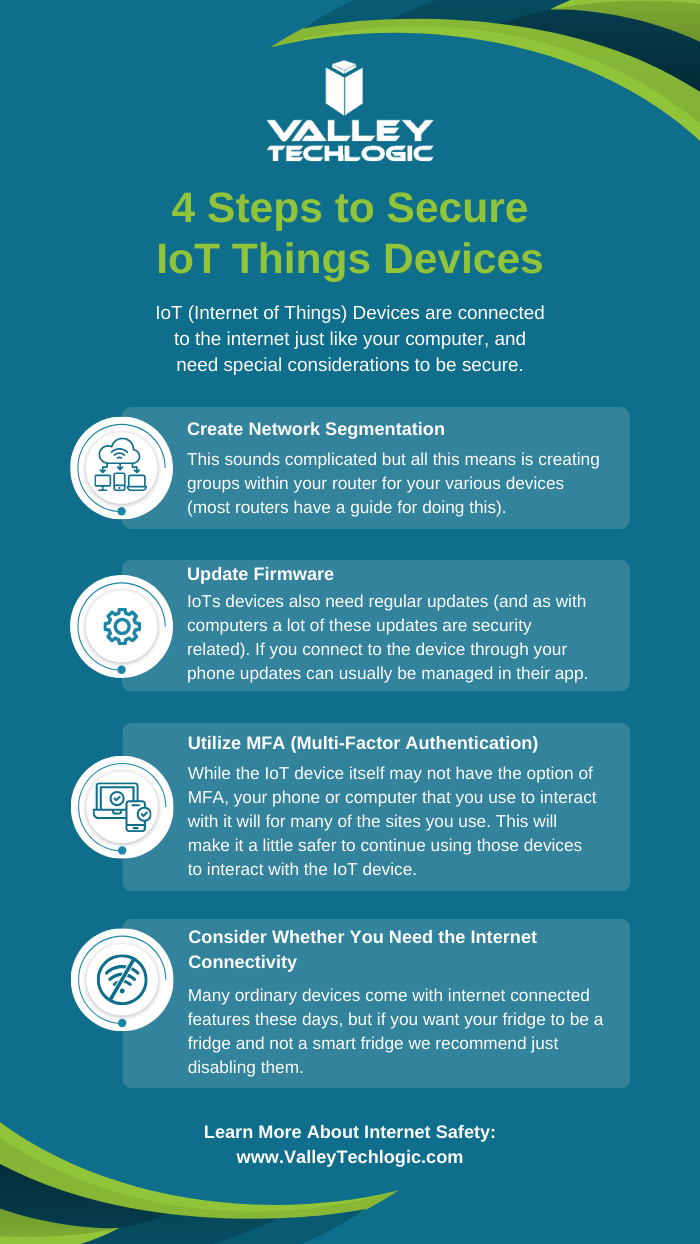
  • Data breached? 5 ways to reduce the impact on your business.

    Data breached? 5 ways to reduce the impact on your business.

    We’ve posted a lot of articles on how to avoid a data breach (here are a couple of recent ones for you to review if one hasn’t happened to you so far and you’d like to keep it that way).

    Unfortunately, we fear that if you’ve reached this article you may be part of the growing number of business owners whose data has been breached (in 2020 there were 700,000 attacks on small businesses with damages exceeding $2.8 Billion).

    Data breach severity varies widely, from an employee email being temporarily hacked all the way to having your backups infiltrated and locked for a ransom – and even if you pay the ransom you still might not recover your data.

    So if you’ve experienced a significant data breach and wondered what you could have done to have a better outcome, or even if you’re in the midst of one now what should you do?

    Here are our top five tips for reducing your data breach costs (now or in the future):

    1. Damage Control – Turn to the pros (like us) when it comes to recovering your data in the event of a breach, they will have access to tools that could recover data that will otherwise be lost if decryption efforts fail in the hands of someone who doesn’t know what they’re doing. Bottom line, know who you’re going to call in an emergency and don’t be afraid to get their help sooner rather than later.
    2. Downtime Mitigation – Downtime is one of the most expensive elements of a data breach, if you don’t already have a disaster recovery plan a previous breach can highlight exactly what needs to be a priority in your business if your data is unavailable. Also, a team like Valley Techlogic can help you create a disaster recovery plan.
    3. Turn to Your Vendors – Your vendors may have some methods for assisting you in the event of a data breach. For example Microsoft has a shared responsibility model for data but if you have Microsoft 365 and use OneDrive, some of that data may still be safe on their end and accessible to you (once your devices have been cleared and are safe to use).
    4. Be Transparent – If your business is very customer facing, an outage in your business caused by a data breach may be very obvious to them. We don’t recommend trying to hide the fact that a breach has happened but instead being transparent about what happened and what you did to fix it, and how you plan to prevent it in the future.
    5. Cyber Prepared – The best way to recover financially from a data breach is to have cyber insurance in place before the attack happens, while it may be too late for a past breach you can prevent future financial loss by using our guide to reviewing and obtaining cyber security insurance here.

    Of course, an ounce of prevention is worth a pound of cure unfortunately when it comes to cybersecurity attacks. We would be remiss not to offer a few tips on preventing a data breach specifically. You can grab this checklist to make sure these items are covered to prevent future data breaches:

    Click to download the full size version.

    If you’re currently dealing with a data breach or have dealt with one in the past and want to prevent future breaches, Valley Techlogic can help. We are experts in cybersecurity and use industry best practices to provide the best security coverage for our customers that is also cyber insurance compliant. Learn more with a consultation today.

    Looking for more to read? We suggest these other articles from our site.

    This article was powered by Valley Techlogic, an IT service provider in Atwater, CA. You can find more information at https://www.valleytechlogic.com/ or on Facebook at https://www.facebook.com/valleytechlogic/ . Follow us on Twitter at https://x.com/valleytechlogic.

  • Be careful what you download, malware has made it to Google Adwords

    Be careful what you download, malware has made it to Google Adwords

    Downloading applications from trustworthy sources is something that has been drilled into most of us as internet safety 101, and many of us would consider the top link on Google to be a trustworthy source.

    However, hackers are now taking advantage of that and pushing ads that contain their malware disguised as legitimate applications.

    Initially reported on by cybersecurity firm Cyble last month, their report found that a malware called “Rhadamanthys Stealer” is being spread through Google Ads that allegedly lead the user to download Zoom, Notepad++, AnyDesk and more.

    This malware is also being spread the typical way through email when attached to a PDF. It makes it clear that there is no one way to spread malware and that users need to be vigilante when downloading anything – whether that be a typical .exe or email file attachment.

    The goal is usually financial, with the hacker either “ransoming” the users device or merely spying in the background as they collect data they can sell or use to steal financial credentials. The attempts at stealing data may even be multifaceted and include all three.

    So how can you protect yourself? The first is in knowing how it works, Google ads has requirements for posting so these bad actors are placing ads for legitimate looking “front page” sites that mimic what you were looking for, which then immediately redirects you to the one containing malware.

    So one clue would be if the URL drastically changes during your browsing (and paying attention to the URL and knowing the URL you were trying to reach would squash this attempt altogether). In many cases you can confirm a sites true URL through Wikipedia and it’s a good idea to save it if it’s a site you visit regularly.

    Another way to block these is exceedingly simple, just utilize an ad block on your browser. Ad blocks block Google advertisements as well, so your research will be more likely to contain legitimate results. Many ad block extensions will also block popups too.

    Google has also offered their own advice on blocking “malvertising” and have included a way to report illegitimate websites. It goes without saying these sites are in violation of Googles advertising rules, which include rules against auto-redirects.

    As it becomes increasingly harder to avoid malware infections, many offices are scrambling with how to best protect office devices from being unintentionally used as a threat vector. Employee training is still your best protection but as this article illustrates, even tech savvy employees may have a difficult time avoiding all threats.

    That’s where a Valley Techlogic service plan comes in, we offer proactive cybersecurity protection in the following ways:

    Proactive Cybersecurity through Valley Techlogic

    If you would like to learn more, schedule a consult with us today and we’ll go over how we can help your business increase your cyberthreat awareness and protection capabilities.

    Looking for more to read? We suggest these other articles from our site.

    This article was powered by Valley Techlogic, an IT service provider in Atwater, CA. You can find more information at https://www.valleytechlogic.com/ or on Facebook at https://www.facebook.com/valleytechlogic/ . Follow us on Twitter at https://x.com/valleytechlogic.

  • ChatGPT is allowing even novice wannabe hackers to construct their own malware

    ChatGPT is allowing even novice wannabe hackers to construct their own malware

    ChatGPT is a power AI chatbot that allows the user to communicate a question to it and receive a very thorough answer on any topic the user can dream up. Created by OpenAI and already fielding massive investment offers even from companies like Microsoft, they’ve had a ton of buzz in the news both positive and negative.

    It first came under scrutiny when it became apparent the tool was great for generating lots of content quickly, including articles that students could use and submit (though the quality of these articles can vary greatly).

    This is because tools like ChatGPT scrub great swaths of the internet for their content. Whether it’s being asked to write a paper on the Civil War or generate a Picasso-esque picture, it takes the prompt and quickly compiles the database of knowledge it has built up from data readily available online and provides the user with what they’ve asked for.

    There has been a lot of discussion around the future of AI and the ramifications of copyright, particularly when it comes to original written works or art, but today we’d like to focus on ChatGPT’s scripting capabilities and the potential pros and cons.

    As leaders in the IT space we were already aware of the buzz around ChatGPT’s scripting capabilities, with some programmers praising it’s ability to create simple scripts and the potential it had to make aspects of their jobs easier. While others lamented what it meant for the programming role as a whole or whether the code output was really “up to snuff” especially when used in real world applications.

    It’s become clear there’s a niche for ChatGPT in creating low level tools, but this unfortunately also includes malware and encryption scripts – which often aren’t very complicated and easily deployed via phishing type scams.

    As reported by Axios, there is already evidence that hackers are using ChatGPT in the creation of malware or in improving their existing attempts to create new malware scripts. There is also evidence that it’s being used by less technically inclined people to create malware they otherwise would not be able to make.

    OpenAI has made statements that they are looking to improve their product and prevent it from being abused, in the interim we would advise users to be especially cautious when clicking on links or downloading files. We wrote an article on how to spot phishing clues online that might be worth a review.

    For businesses who have made getting serious about cybersecurity a primary goal in 2023, here are 6 ways Valley Techlogic can help.

    Click to grab the full size version.

    Looking to learn more? Schedule a quick consultation with us today or take advantage of our 2-hour free service offer to experience our commitment to quality service for yourself.

    Looking for more to read? We suggest these other articles from our site.

    This article was powered by Valley Techlogic, an IT service provider in Atwater, CA. You can find more information at https://www.valleytechlogic.com/ or on Facebook at https://www.facebook.com/valleytechlogic/ . Follow us on Twitter at https://x.com/valleytechlogic.

  • More data breach woes for LastPass and our recommendations for you on how to deal with it

    More data breach woes for LastPass and our recommendations for you on how to deal with it

    We’ve posted about LastPass data breaches before but at that time it was purported to be a false alarm according to the company, the news on this most recent breach is that it’s real and that LastPass users should be concerned.

    The data breach in question happened in August but LastPass is just now revealing the details on what was stolen and the scope of breach. At the time of the hack LastPass was again saying that it was a false alarm but that wasn’t true and “backup customer vault data” was accessed during the August incident.

    This backup vault data included both unencrypted data such as website URLs and encrypted data such as website usernames and passwords. Having both details will allow hackers to easily put two and two together to access customer accounts.

    With that said because the data for usernames and passwords is still encrypted LastPass has let customers know their data is still safe, as they say it can only be unencrypted with their unique encryption key that is derived from your master password. User master passwords are not accessible due to their “Zero Knowledge” architecture.

    With this architecture no one, not even LastPass themselves, has access to a user’s master password. LastPass requires that master passwords be 12 characters long so even if the hackers who accessed this data attempt to brute force individual passwords it would still be difficult to impossible, with LastPass themselves estimating it would take “millions of years using generally-available password-cracking technology”.

    LastPass users should still be on the lookout for phishing attempts in the upcoming days however, even if your data is safe bad actors may still use the news of this breach to attempt to trick users into revealing their data. You should never share your password details with anyone, especially your master password. LastPass will never ask you for your password information.

    Also some additional advice for business owners who may own websites from Google, because the URLs in this breach were not encrypted they may include some that you didn’t want publicly accessible. John Mueller a SEO expert at Google recommends reviewing any website URLs you may have that may inadvertently leak data for your business, including customer form data.

    We still believe password managers are a security benefit to both consumers and businesses alike. They’re one small part of increasing overall cybersecurity awareness and safety and fall under the larger spectrum of increasing user education and accountability.

    We’ve posted about proper password safety and advice on avoiding phishing attacks, but here are the top 5 things you can enable in your business today to improve your cybersecurity safety in 2023.

    Internet Safety InfographicIf news of breaches make you nervous and you aren’t sure if your business is prepared from a cybersecurity standpoint, Valley Techlogic can help. We consider ourselves to be a premier provider of cybersecurity services for businesses in our area and beyond. We can help your business by covering your endpoints, setting up secure backups, virus and malware scanning and prevention and more. Schedule a consultation today.

    Looking for more to read? We suggest these other articles from our site.

    This article was powered by Valley Techlogic, an IT service provider in Atwater, CA. You can find more information at https://www.valleytechlogic.com/ or on Facebook at https://www.facebook.com/valleytechlogic/ . Follow us on Twitter at https://x.com/valleytechlogic.

  • October is Cybersecurity Awareness Month, now in its 18th year

    October is Cybersecurity Awareness Month, now in its 18th year

    We’re announcing this a bit late, but we did want to touch on this annual event (now in its 18th year). Every year CISA (Cybersecurity and Infrastructure Security Agency) releases new resources that are free to download and share for Cybersecurity Awareness Month. The theme this year is “See Yourself in Cyber” and we appreciate the effort to help everyone understand that cybersecurity measures are up to all of us to maintain.

    So many cybersecurity measures feel very passive, you’re protected by your anti-virus or firewall automatically. Your IT team helps you navigate any issues that make come up. For businesses, advanced cybersecurity threat protection can detect a threat just from activities that fall outside the norm (like your computer being online at three in the morning) and send you a warning.

    Unfortunately, hackers are always trying to circumvent these automatic measures no matter how advanced they become. The human element is still the biggest cybersecurity threat to your network and business. That’s why acknowledging we all have a role to play in preventing cyber threats is so important.

    CISA recommends four important steps we all need to take online:

    1. Think Before You Click: Before you click on that link in an email or download an attachment, do a little research. Is the sender who you expect it to be? Phishing emails are still the #1-way users are hacked.
    2. Update Your Software: This is good common-sense advice; most patches also include important security updates and it doesn’t take very long to install them (and for Windows devices you can even have them run automatically).
    3. Use Strong Passwords: This is another easy one and if you use one of our password manager recommendations, it’s even easier to create stronger passwords that you don’t have to manually remember.
    4. Enable Multi-Factor Authentication: This is CISA’s fourth tip for this year and lucky for you we have a guide for this too.

    These tips may seem simple, but they will be hugely beneficial to preventing a cyber threat for you, your business or your employees. However, you can take it a step further and engage with cyber security training.

    You may be wondering what that would look like, well you’re in luck. We have a sample training session right here for you to review with your employees:

    This is just a quick sample lesson; through our partner we have bite sized lessons that include video that you and your team can take to beef up your cybersecurity knowledge. They average 2-3 minutes long with a quick quiz at the end to make sure the knowledge was absorbed, and you can even see your employees average scores to see how everyone is doing.

    If you incentivize taking this training it will not only be a team building opportunity, it will also help your business stay safe from cyber security threats. If you’d like to learn more about cybersecurity training or stepping up your cybersecurity measures in your business (including the aforementioned advanced cyber threat detection) reach out today for a consultation.

    Looking for more to read? We suggest these other articles from our site.

    This article was powered by Valley Techlogic, an IT service provider in Atwater, CA. You can find more information at https://www.valleytechlogic.com/ or on Facebook at https://www.facebook.com/valleytechlogic/ . Follow us on Twitter at https://x.com/valleytechlogic.