
Tag: managed services

  • Hiring a tech vs outsourcing, a cost breakdown

    Hiring a tech vs outsourcing, a cost breakdown

    If you’ve realized you need additional IT support for your business but are on the fence about which route to take, hiring IT staff or outsourcing your needs to an IT service provider the choice can be difficult.

    Many of our clients reach us because they have been using an unreliable IT support service, their existing IT staff left, or sometimes because they’ve somehow gotten by with no IT at all but realize that needs to change.

    We also frequently have clients who are utilizing a person in their office who is “tech savvy” but is not IT, it can be quite expensive to hire an IT professional with the experience needed to perform the variety of duties needed work on items such as cybersecurity improvements, hardware upgrades, software deployments and more.

    Here are some benefits of hiring in house IT staff:

    1. They’re already at your office so there’s no waiting for IT support to show up.
    2. They will be well versed on your systems since in many cases they will be the one who set them up in the first place.
    3. They should be pre-emptively taking care of updates that will keep your business more secure.

    On the other hand, here are the benefits of outsourcing your IT:

    1. The cost is usually much lower than hiring personnel.
    2. You get many experts for one price, no matter how well versed your IT person is they can’t be an expert in everything.
    3. You get software tools that may be otherwise unavailable to a single business or not cost effective to purchase.
    4. Round the clock service and monitoring, many IT service providers including us offer 24/7 support.
    5. You will have an agreement with them that spells out the level of service you’re supposed to receive.

    It’s a difficult choice and only you know whether your business would greatly benefit from having in-house staff or whether outsourcing your IT is your best option. As you weigh your options we created this chart with the average baseline cost for an in-house IT person vs. an IT service plan with us.
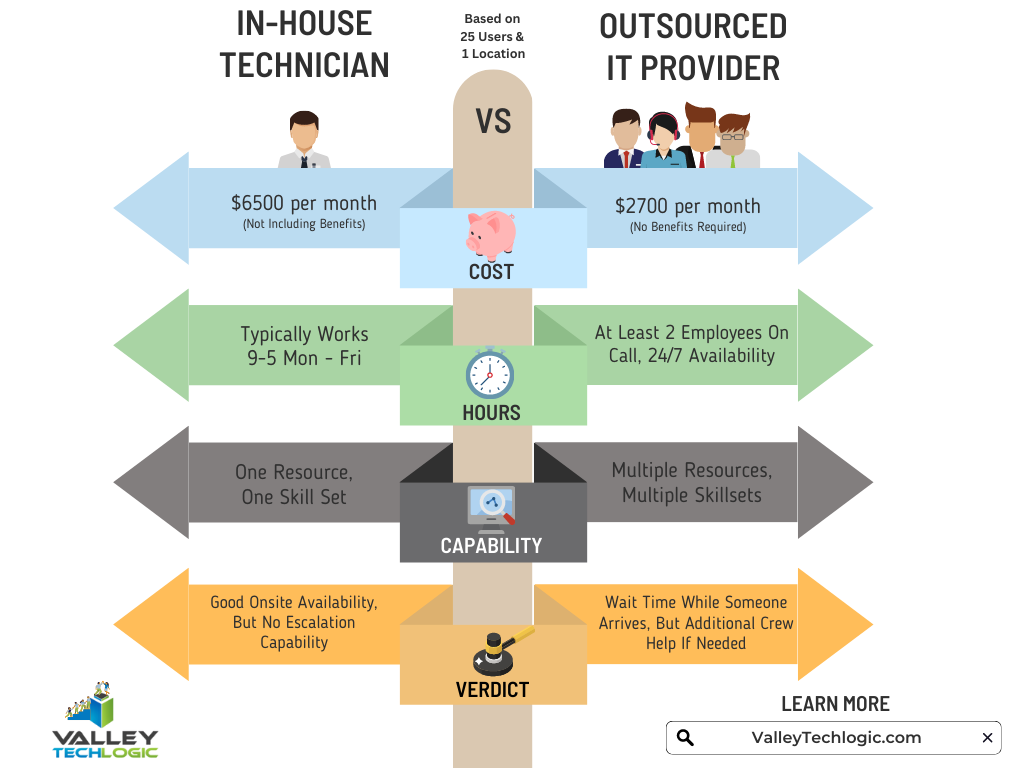
    However, as we mentioned many of our clients are utilizing an in-house resource already, these tech savvy staff are usually performing the day-to-day activities such as patching and password resets but may be missing crucial items such as cybersecurity prevention or maintaining (or even starting) backups.

    For clients like these we recommend our co-managed plan option. With our co-managed plan we work directly with the staff already performing your IT duties, if there’s an issue they call us directly and we pass on a cost savings to you.

    We do that because usually by working with a staff member that already knows your systems we can bypass a lot of the early troubleshooting that occurs, and that staff member usually still handles minor day to day tech related activities.

    If you would like to learn more about our co-managed plan options just reach out today for a consultation.

    Looking for more to read? We suggest these other articles from our site.

    This article was powered by Valley Techlogic, an IT service provider in Atwater, CA. You can find more information at https://www.valleytechlogic.com/ or on Facebook at https://www.facebook.com/valleytechlogic/ . Follow us on Twitter at https://x.com/valleytechlogic.

  • On the Fence About Outsourced IT? Here are the Top 5 Reasons to Consider it.

    On the Fence About Outsourced IT? Here are the Top 5 Reasons to Consider it.

    Now as a provider of outsourced IT we’re considerably biased, but we also know the value outsourcing some or all of your IT can provide to your business. We wanted to touch on the top reasons you should consider utilizing outsourced IT in your business.

    First though we would be remiss if we didn’t go over the variety of outsourced IT available on the market. From a single person who helps on a contractor like basis to full scale operations that are the same as having an entire IT department, the differences in what’s out there is vast and there’s something available for every business.

    To decide on what variety is right for you, you need to consider what your businesses needs are. Do you already have an IT team and just need some additional assistance with routine tasks hamstringing your business currently? Are you utilizing the “a wish and a prayer” model by having no IT at all? NOT a good idea by the way.

    We developed this chart to help businesses figure out what kind and what level of outsourcing they may need.

    When to Outsource Chart

    In addition to our chart here are 5 examples of how outsourced IT can bring your business to the next level.

    1. Is the cabling in your office currently a nightmare? Do you walk into the server closet and find yourself wondering if it’s up to code or perhaps even a fire hazard? This is one project no one wants to tackle but once it’s done, you’ll wonder how you went so long without it.
    2. Your IT team is great, but they’re so bogged down with the day to day minutia they don’t have time to bring your business to the next level. Do you have upgrades that have been on the back burner forever? Or perhaps they just don’t have time to maintain your backups as well as you would like. Outsourced IT can fill in the gap and give you the footing you need expand your business.
    3. Remote IT, setting this up right can feel like an impossible task. Maybe your workers are regularly stuck unable to do their job due to login issues, or you just aren’t sure how to approach the topic of cyber security with your employees working from home. Outsourced IT can be the extra hands you need to get it going right.
    4. Perhaps you’ve been telling yourself, who needs IT? You’ve gotten by this far without it. We’re sorry to say, that’s just luck, and you don’t want to hang your business on continuing to stay lucky.
    5. Training new IT staff is difficult and expensive, with an experienced IT provider you don’t need to worry about that and can instead focus on your core business.

    This is in no way an exhaustive list of all the ways we think outsourcing IT could be a smart choice for your business. One thing we do want to mention is to vet the company you choose to outsource to carefully, you’re trusting them with your data and network after all.

    Choose a company with good reviews and references and one that guarantees the work they do. Also, if you’re thinking about switching IT providers it’s okay to vet the new company before letting the old one know you’ll be moving on.

    If you need more advice or assistance on this or other technology topics, reach out! At Valley Techlogic we’re here to help.

    Looking for more to read? We suggest these tech articles from the last week.

    This article was powered by Valley TechLogic, an IT provider in Atwater, CA. You can find more information at https://www.valleytechlogic.com/ or on Facebook at https://www.facebook.com/valleytechlogic/ . Follow us on Twitter at https://x.com/valleytechlogic.
    Looking for IT Services in Fresno, Modesto, Stockton, Ceres, Atwater, Merced, Visalia or Lodi? We cover all these areas and more!

  • Windows 7 End of Life: Upgrade your existing machine or start fresh?

    A laptop upgraded windows.January 14th, 2020 looms ever closer and you may be scrambling for a solution to one problem: Does it make sense to upgrade your existing machine or purchase a new one?

    I can’t say for certain which one is the better option for you or your business, but one thing is for certain, remaining on Windows 7 after support ends is a dangerously ill-advised idea.

    Windows 10 released July 29, 2015, so chances are if your machine is still running Windows 7 it’s older than the 3 years I personally recommend a machine be replaced by. We know this is not always feasible so here are the minimum specs we recommend for an upgrade to Windows 10:

    • In my experience your machine will need at least 8 GBs of ram to run Windows 10 relatively smoothly, but ideally it will have at least 16 GBs at this point in time so it has enough power to run the operating system and all the processes you may use day to day.
      Something else to consider is whether your ram is soldered (very common in laptops), if it is an upgrade will not be possible.
    • Your CPU is something else to consider when upgrading or buying, here at Valley TechLogic we recommend Intel CPU’s and more specifically at least Core i-5 or Core i-7, both will run Windows 10 effectively but Core i-7 will be much more future proof.
    • A Solid State Drive, many older machines still use highly failure prone mechanical hard drives. A solid state drive will be less prone to hardware failure and it loads much faster. On average solid state drives load 5 to 20 times faster than a mechanical drive.
    • You may also need to purchase the Windows 10 license, at the present time that will run you $199.99 for a Pro license (what we recommend in a business setting).
    • There also may be a cost to having these upgrades performed for you if you don’t currently have an all encompassing Managed IT Plan in place (learn more here). This cost can really add up if you own a business with more than one outdated machine.

    Depending on your situation the costs associated with upgrading an existing machine may not make sense in the long run. Purchasing a new machine is an investment, and when done thoughtfully it will last many years into the future.

    It’s also possible to transfer your existing computer files from the old machine to the new one – even system settings – making the switch painless.

    Here at Valley Techlogic we work with our customers to come up with a solution that makes sense for their business, whether they’re upgrading existing computers with new hardware or helping them purchase a new one through our affiliates.

    We work to minimize downtime and through our comprehensive Managed IT Department plan upgrading is a covered project. If you’re in the Central Valley reach out today to see if we can help you with this end of life event, or any other IT projects you may have coming up.

    This article was powered by Valley TechLogic, an IT provider in Atwater, CA. You can visit us on Facebook at https://www.facebook.com/valleytechlogic/ . Follow us on Twitter at https://www.twitter.com/valleytechlogic .