
Tag: technology savings

  • Maximizing your tax deduction potential with Section 179

    Maximizing your tax deduction potential with Section 179

    It’s September which means we’re almost to the fourth quarter where most businesses look ahead towards end of year activities, it’s not unusual for us to see an increased interest in locking down new equipment and upgrades before year end.

    Each year we begin promoting the benefits of Section 179, you can learn more about it in our updated guide for 2023 or continue reading.

    In a nutshell, Section 179 is a tax savings benefit that allows you to deduct the cost of equipment you use for work from your (in some cases up to 100% of the total cost) from your tax expenses. When used correctly, this means you can purchase upgrades for your business and receive that money right back into your business when you file the following year.

    Section 179 is a permanent part of the tax code here in the United States but that doesn’t mean it’s static. Each year the deduction limits are adjusted for inflation. You can see on the chart below what this year’s limits are.
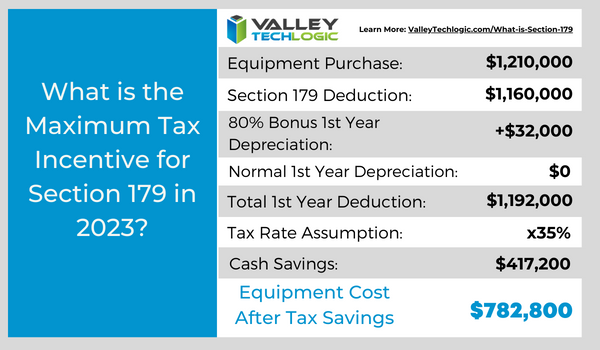
    You can choose to take the deduction in one lump sum or take a deduction for depreciation each year instead – it’s completely up to you.

    What equipment or technology purchases qualify for Section 179?

    1. New Equipment: This includes computers (as long as they’re used in your business at least 50 of the time), servers, backup devices, phone system hardware and more.
    2. Components: Such as hard drives and solid-state drives, RAM, video cards, monitors and more.
    3. Refurbished Equipment: You don’t have to buy new equipment to qualify for Section 179, in fact if you’re in the market for a new server and have been debating new vs refurbished, we have an article where we weigh in here. Equipment can also be financed or leased and still qualify.
    4. Software: If you’re looking to purchase software upgrades for your business this year – such as upgrading an older copy of Windows to the latest version – these would also qualify.
    5. Professional Services: Even professional services like ours can possibly be deducted under Section 179.

    We find many businesses are looking to make purchases before the year end because that’s when a clearer picture of their financials is available but be warned. For a purchase to qualify in 2023 these purchases must be made before December 31st. Even if the purchase was planned as part of this year’s budget, if it’s purchased January or later it will not count for this year’s taxes.

    If you’re looking for the exact math on a potential purchase and the savings you will net, we can recommend this calculator, it has been updated for 2023. It’s also important to note that the ceiling for your particular business is your net income, you cannot deduct more money than you made that year, however you can carry the deduction forward to the next year.

    We’ve spent some time discussing what does qualify under Section 179, but what about what doesn’t? The following items would not qualify under Section 179:

    1. Intangible Assets: This would include things like patents or copyrights as an example.
    2. Land: You cannot purchase land and claim a deduction for Section 179.
    3. Purchased from family: Unfortunately, you cannot claim purchases that are made through a family member. Even if the product itself would normally qualify, if the item was purchased through a sibling, parent’s or spouses’ separate business it will not qualify.

    Interested in making technology upgrades in your business and utilizing Section 179 in 2023? Valley Techlogic can help, we offer procurement services as well as technology solutions that are covered by this very useful tax code. Learn more today by scheduling a consultation.

    Looking for more to read? We suggest these other articles from our site.

    This article was powered by Valley Techlogic, an IT service provider in Atwater, CA. You can find more information at https://www.valleytechlogic.com/ or on Facebook at https://www.facebook.com/valleytechlogic/ . Follow us on Twitter at https://x.com/valleytechlogic.

  • Thinking about buying new tech for your business in 2023? Here are our top 10 tips

    Thinking about buying new tech for your business in 2023? Here are our top 10 tips

    We recently touched on the tax savings benefits for making technology purchases before the new year, however maybe you’re only in the beginning stages of thinking about replacing equipment in your business and aren’t ready to go ahead and buy before 2022 is over.

    We’re a fan of making big technology purchases in bulk when it comes to our clients, instead of a mish mash of devices that all have different warranty times, hardware capabilities and software available to them you have one set of devices that can be managed in much the same way for their entire life span because they all came from the same place at the same time.

    While that Isn’t always achievable, you can accomplish almost the same goal by buying in sections as well. Maybe management devices get replaced first, followed by team 1 and team 2. Just any kind of organizational system to your technology buying beats the technology clutter of having everyone working on something different.

    Of course there are different considerations if your business BYOD (bring your own device) which we’ll touch on next week. Besides trying to make your technology purchases at roughly the same time here are 10 more tips for business technology buying in 2023.

    1. Research is key. Not all laptops for example are created equal (and the same goes for every other device) you want devices that will more than cover the requirements of Windows 10 or 11 and still perform well.
    2. On the same token, look up reviews. Sometimes a product SKU is problematic, it would be bad to read reviews about your chosen laptop having a problem with premature device failure AFTER you’ve bought 10 of them.
    3. Consult your employees. Your employees may have opinions about what is crucial to them in a work device, for example if you have one employee who handles your graphic design they may need extra memory or a better video card added to their particular device to do their job effectively.
    4. Spend a little extra on the extended warranty. You want these devices to last a long time for your business as they’re a big investment, it’s worth it to purchase the extended warranty (Dell offers up to 5 years for example).
    5. Look into what kind of support the company offers if you do encounter a problem. On the same page as the last tip, you want to make sure if one of the devices breaks or encounters a problem you can easily have it fix. Lenovo is another vendor we work with and they offer onsite repair of devices at a low additional cost.
    6. Consider consulting your software vendors. If you use a proprietary software in your business it’s especially important to make sure your chosen device will work with it (especially if we’re talking about replacing an onsite server).
    7. To follow up on that, if you’re considering replacing your server it might be a good time to consider the cloud. Onsite servers are a very expensive investment, we have seen more clients move to the cloud in 2022 than ever before. If your server has come up for replacement it might be worth researching before making that purchase.
    8. If you do want to purchase another onsite server, consider refurbished. Ordinarily we shy away from refurbished but when it comes to servers it can be a smart investment and we’ve found they perform just as well as new, we have saved clients thousands of dollars when they choose this option.
    9. You can choose the cloud for employee devices as well. If you have a BYOD format but still want the uniformity and security of having everyone connect from a similar machine, we recommend Windows 365. It’s a cloud PC your employees would connect to from their current device, it can give them the benefit of using a PC with more powerful hardware if you chose and you can manage these devices under one platform.
    10. Work with your IT provider to take advantage of their partnerships. Finally, if you have an IT provider it’s worth asking if they have partnerships with any vendors that can help you get a better deal. We have partnerships with Dell and Lenovo and utilize them to benefit our clients regularly. You can learn more about that here.

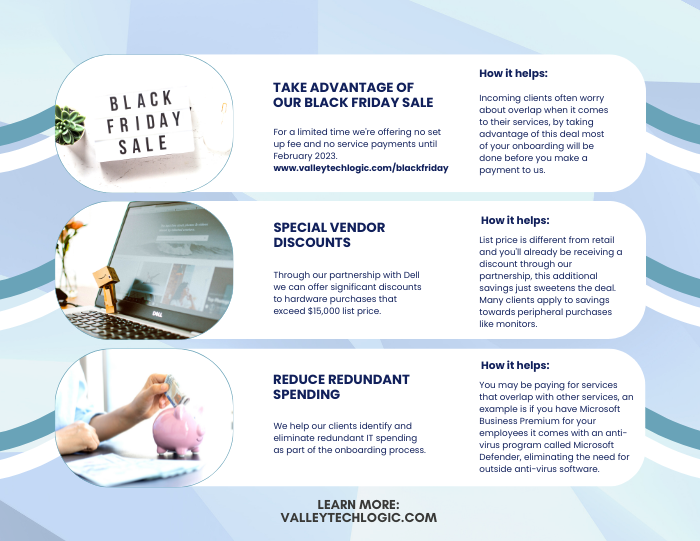
    Here are three ways you can save right now on your technology spending:

    Three additional money savings tips.Procurement services is something we reserve for clients. If you’d like to learn more about how we can help you purchase new devices and maintain them, click here to schedule a consultation.

    Looking for more to read? We suggest these other articles from our site.

    This article was powered by Valley Techlogic, an IT service provider in Atwater, CA. You can find more information at https://www.valleytechlogic.com/ or on Facebook at https://www.facebook.com/valleytechlogic/ . Follow us on Twitter at https://x.com/valleytechlogic.